

In January I hit month three of lower-back tension that nothing was fixing. A new chair helped some. Stretching helped a little. But the real problem was that I was sitting for six to eight hours straight, and I knew it. I had a perfectly good desk and no budget or inclination to tear it out and replace it with a full motorized standing desk. So I ordered the VIVO K-Series 32-inch desk converter, set it up on a Tuesday morning, and started tracking what actually changed. Six months later I still use it every single workday, and I have opinions.
This is the long-term-use review. If you want the quick spec rundown you can find that anywhere. What I want to give you is the answer to the question I could not find when I was shopping: what does this thing feel like after the novelty wears off? Does the spring mechanism hold up? Is the keyboard tray actually usable? And how much does the wobble at full height actually matter for daily work? I will answer all of that.
The Quick Verdict
A sturdy, genuinely practical sit-stand converter that earns its place on a real work desk, with two honest caveats: the keyboard tray is shallower than it looks, and there is noticeable wobble above 14 inches.
Amazon Check Today's Price →Your back has been asking you to stand up for months. Here is the converter that makes it easy enough to actually stick with.
The VIVO K-Series 32-inch converter is the one I use daily. It takes under ten minutes to set up, works on any existing desk, and costs less than one month of a physical therapy copay.
Amazon Check Today's Price on Amazon →How I Have Used It
My setup is a 60-inch wooden desk in a spare bedroom that I converted to a home office in 2023. The desk sits against the wall, which matters because the VIVO converter extends backward about six inches when raised, and if your desk is flush against drywall you will need to pull it forward before raising. I did not know that before I ordered. First lesson.
My monitor is a 27-inch 1080p display that weighs about ten pounds. My laptop sits to the side on a stand. I type on an external keyboard. For the first month I stood for about 25 to 30 minutes per session, twice a day, mostly because my feet were not used to it. By month three I was standing for 45 to 60 minutes at a stretch, which is roughly where I have stayed. I tracked this loosely with a reminder app set to go off every 45 minutes.
I raise and lower the converter four to six times on a typical workday. In six months I have had zero mechanical failures. The spring tension has not changed noticeably. That alone puts it ahead of what I expected at this price point.
The Spring Mechanism: What It Feels Like After Six Months
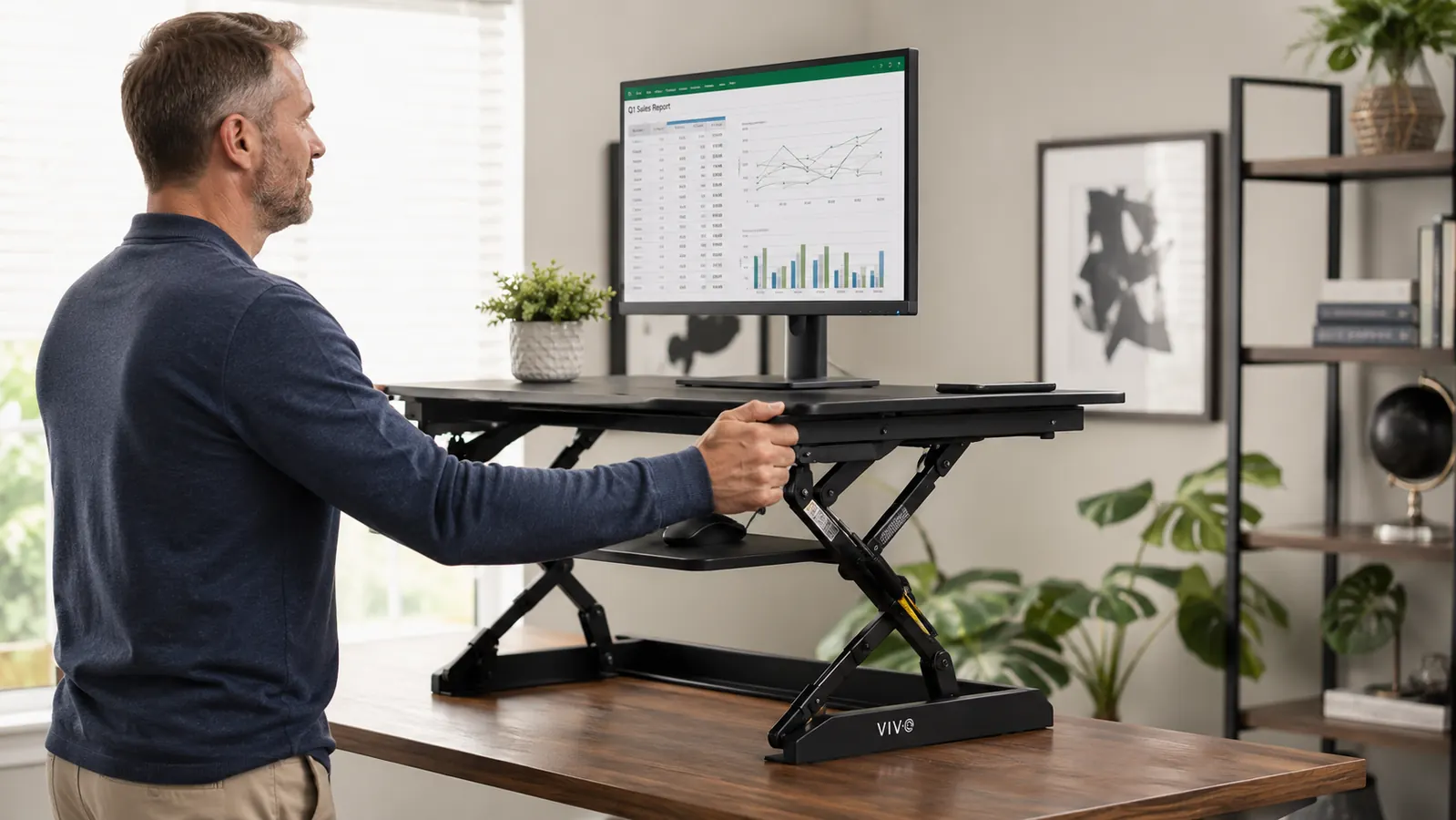
The VIVO K-Series uses a gas-spring lift mechanism controlled by a squeeze handle on the left side of the unit. You squeeze the handle, lift or lower the platform, release the handle, and the unit locks in place. In theory. In practice, the lock is solid and I have never had the platform drift down under load. That was my first concern and it has not materialized.
The resistance feels appropriate for a 27-inch monitor plus keyboard weight. If you are putting two heavy 27-inch or larger monitors on the platform, read the weight limit before ordering. The K-Series is rated for 33 pounds. My single monitor plus keyboard sits well under that. Two full-size monitors would push it.
After six months the handle still clicks cleanly. There is no grinding, no stiffness, no feeling that the mechanism is wearing out. For a budget piece of equipment, that durability record genuinely surprised me.
The Wobble Problem: Honest Assessment
I am going to tell you about the wobble because it is real and most reviews gloss over it. At the lowest height settings, the unit is rock solid. At mid-range, around eight to ten inches of lift, it is stable enough that I never think about it. Above twelve to fourteen inches, meaning near the top of its range, there is lateral wobble when you type. Not dramatic wobble. But if you hit your keyboard with any authority, you will see your monitor move a few millimeters side to side.
Here is my honest take on that after six months: it bothered me for the first two weeks, and then I stopped noticing it. My standing height is 5 feet 8 inches, and my comfortable working height on the converter is about eleven inches of lift, which falls just inside the stable zone. If you are taller than me, say 6 feet 1 or above, your comfortable standing height might push you into the wobble zone more consistently.
If you type hard and you are tall, factor this in. If you are average height and you type with a light touch, this will probably not affect you after the first week of adjustment.
The wobble is real above fourteen inches. But at my working height of eleven inches of lift, I stopped noticing it after two weeks. Taller users should factor this into their decision.
The Keyboard Tray: The Detail Nobody Mentions
The K-Series includes a slide-out keyboard tray underneath the main platform. It slides out on a track and drops slightly below platform height, putting your keyboard and mouse at a more ergonomically correct angle when you are standing. Good idea. Here is what the product photos do not communicate clearly: the tray is about 11.5 inches deep front-to-back. That fits a standard keyboard just fine. But if you are using a full-size keyboard with a numpad, the keyboard itself is right at that depth limit, and there is almost no room left for a mouse.
I solved this by keeping my mouse on the main platform surface instead of on the tray. That works, but it is slightly less ergonomic than having the mouse at the same lower level as the keyboard. If you have a compact or tenkeyless keyboard, this is not an issue. If you are running a full-size keyboard with numpad, plan for this.
The tray surface itself is smooth and holds a mouse pad fine. The slide mechanism has stayed smooth over six months with no sticking or play developing in the track. That is another mark in the durability column.
What Changed After Six Months of Sit-Stand Switching
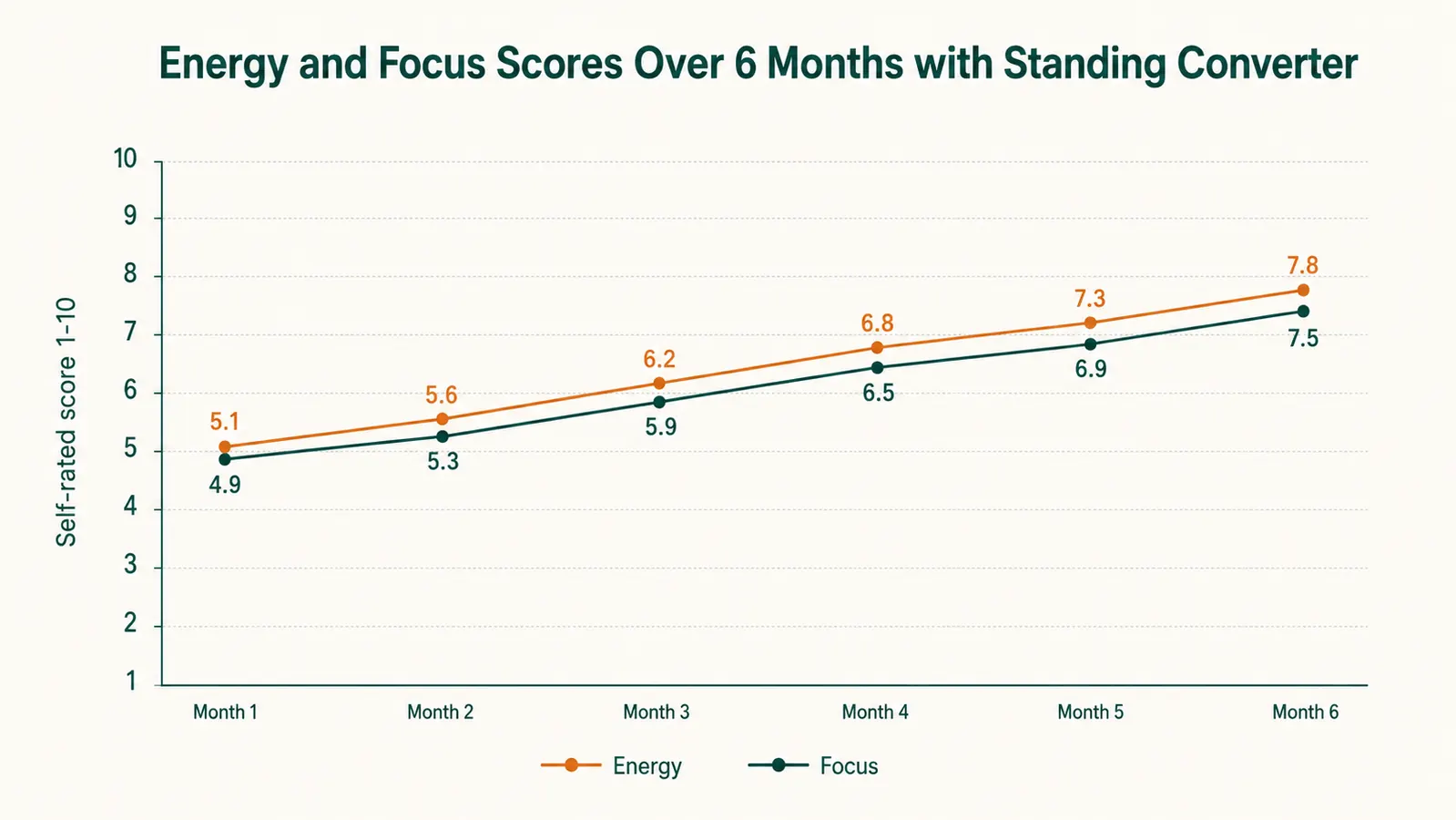
This is the question that actually matters. My lower-back tension, the reason I bought this in the first place, is genuinely better. Not gone completely, because sitting is still sitting and I still do plenty of it. But the sharp tension I used to feel by 3 p.m. most days has shifted to a mild stiffness that I notice maybe two days out of five. I attribute this partly to the standing intervals and partly to the fact that the converter forced me to be more intentional about my posture during sit sessions too.
My afternoon energy is also better. This one surprised me. Standing for 45 minutes after lunch instead of slumping in a chair makes a real difference in how awake I feel by 2 p.m. I did not expect a piece of furniture to affect my cognition, but it has.
The converter also changed how I structure my work. Standing tends to make me focus on high-energy tasks like writing drafts and returning emails. Sitting feels more suited to deep reading and slow analytical work. Over time I have started routing task types to my standing or sitting mode, which has been an unexpected productivity benefit.
What I Liked
- Spring mechanism has held up completely through six months of daily cycling
- Setup takes under ten minutes with no tools required
- Solid stability at the height range most users will actually work at
- Keyboard tray slide is smooth and stays smooth over time
- Surface area fits a 27-inch monitor plus laptop side-by-side comfortably
- Well below the price of a motorized standing desk with 80 percent of the benefit
Where It Falls Short
- Noticeable wobble at full height extension, above about fourteen inches of lift
- Keyboard tray depth is tight with a full-size keyboard plus mouse
- Unit extends backward when raised, requires desk clearance from the wall
- 33-pound weight limit rules out dual heavy monitors
- The black surface shows fingerprints and dust easily

Who This Is For
The VIVO K-Series is the right buy for anyone who works at an existing desk, does not want the cost or commitment of a full motorized frame, and genuinely needs to start sitting less. It is particularly well-suited to people running a single monitor setup, people with a compact or tenkeyless keyboard, and anyone who is 5 feet 11 or under (where comfortable standing height lands in the more stable lift range). It works well in apartments and small home offices where you cannot add square footage. If you have spent months telling yourself you will stand more, this is the kind of low-friction tool that actually gets the habit started because it is effortless to raise and lower.
Who Should Skip It
If you are running two heavy 27-inch or larger monitors, you need to check weights carefully or look at a sturdier converter. If you are 6 feet 2 or taller and you type with any force, the wobble at your comfortable working height may genuinely frustrate you, and a full motorized desk might be worth the investment. If you want to stand for three or four hours straight every day, the absence of a beveled front edge on the main platform means your wrists will eventually feel the hard corner, and a model with a padded or curved front may suit you better. And if you are renting and cannot pull your desk away from the wall, test your clearance before ordering.
Six months in, I still raise this thing every morning without thinking about it. That is the highest compliment I can give a piece of home office gear.
The VIVO K-Series 32-inch desk converter fits virtually any existing desk, sets up in minutes, and solves the sit-too-long problem without replacing your furniture. Check today's price on Amazon before it moves.
Amazon Check Today's Price on Amazon →