

About fourteen months ago I started waking up with a dull ache along my right forearm that ran from my elbow to my pinky. Not sharp, not alarming, just there, every morning before I even reached for coffee. I write for a living, which means six to eight hours of typing a day, five days a week, and I had been doing it on a standard flat Apple Magic Keyboard for three years. I knew, the way you know a weird noise in your car engine, that something needed to change before it got worse. I ordered the Logitech Ergo K860 and figured I would give it a real trial. I did not expect to still be using it twelve months later. I did not expect to feel strongly enough about it to write this.
What follows is not a weekend impressions piece. It is a year of notes, recalibrations, and honest reckonings with a keyboard that costs more than most people expect to spend on input devices. I am going to tell you what got better, what did not, and the specific situations where the K860 earns its price, and where it probably does not.
The Quick Verdict
A genuinely therapeutic typing tool for full-time writers and heavy keyboard users. The learning curve is real but short, and the long-term wrist relief is not marketing, it is mechanical fact.
Amazon Check Today's Price →Still waking up with forearm or wrist ache from typing? That does not fix itself.
The K860 is one of the few keyboards where the ergonomic design is grounded in real biomechanics, not marketing copy. Check today's price on Amazon and see if it fits your budget.
Amazon Check Today's Price on Amazon →How I Have Used It
My daily work is writing long-form articles, usually 1,500 to 3,000 words each, five or six pieces a week. I also write emails, editorial notes, and the occasional sprawling Google Doc that nobody asked for. On a busy week I am putting in roughly 30,000 to 40,000 keystrokes a day. The K860 has been my primary keyboard for all of it, connected to a MacBook Pro M2 via Bluetooth, channel one. I keep a backup wired keyboard in the desk drawer for the rare occasions Bluetooth hiccuped, which I can count on one hand in twelve months.
I sit at a fixed desk, not a standing converter, at a height of 29 inches. My monitor is on a separate stand at eye level. This matters because the K860's negative tilt legs, the small feet at the front that lift the near edge of the keyboard, are designed to work with a specific desk-to-elbow relationship. If your desk is too high or your chair is too low, the tilt feels wrong. I spent about a week adjusting my chair height before the keyboard started feeling natural. That week is not the K860's fault, it is the fact that most people have never thought carefully about their typing posture before.
I type on it at a home office desk in a quiet room. No open-plan noise considerations, no hot-desking, no carrying it in a bag. If portability is your primary concern, this keyboard is not built for that life. It is 430 mm wide and 210 mm deep and it weighs just over a kilogram. It wants to live on a desk.
The Learning Curve: Weeks One Through Four
I want to be direct about this because it is the most common reason people return the K860 within the refund window. Your typing speed will drop. Mine dropped from around 94 words per minute to roughly 68 in the first week. The split layout separates the keys at an angle that exposes every bad habit your fingers have developed over years of flat keyboard use. I was hitting B with my right index finger instead of my left. I was reaching across the gap for T when I should not have been. Every small cheat you have built up over thousands of hours on a straight keyboard becomes visible.
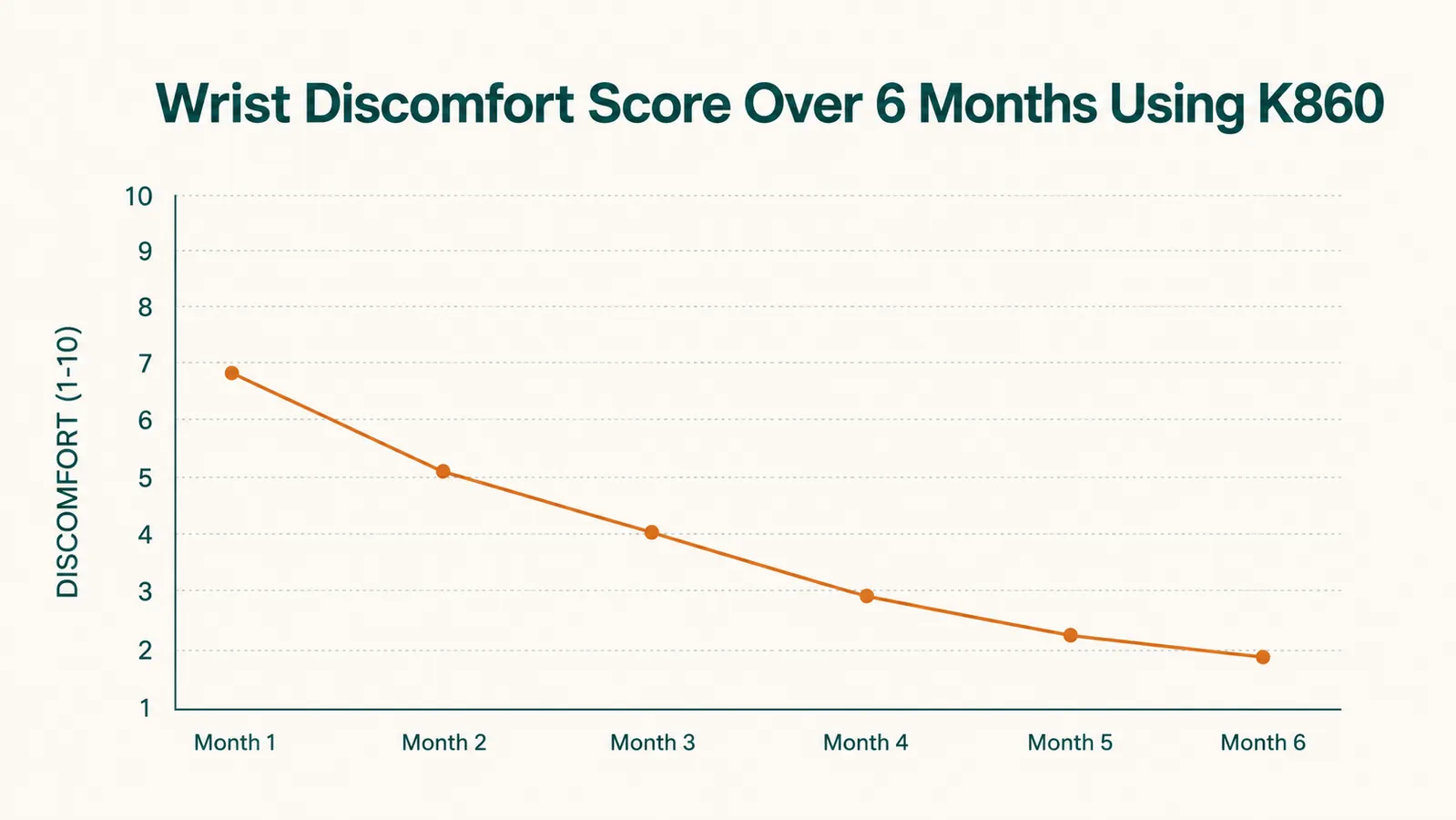
By week two the speed was back to about 78 words per minute. By week four I was back at baseline, around 92 to 95, and by week six I was slightly faster. More importantly, the forearm ache had faded from daily to occasional. By the end of month two it was gone. I cannot attribute that entirely to the keyboard because I also adjusted my chair and stopped leaning on my right wrist, but the K860 forced both of those changes by making the wrong posture immediately uncomfortable. That is, honestly, a feature.
By week four I was back at my baseline typing speed. By week six I was slightly faster. The ache that had been waking me up every morning was gone by the end of month two.
What the Wrist Rest Actually Does
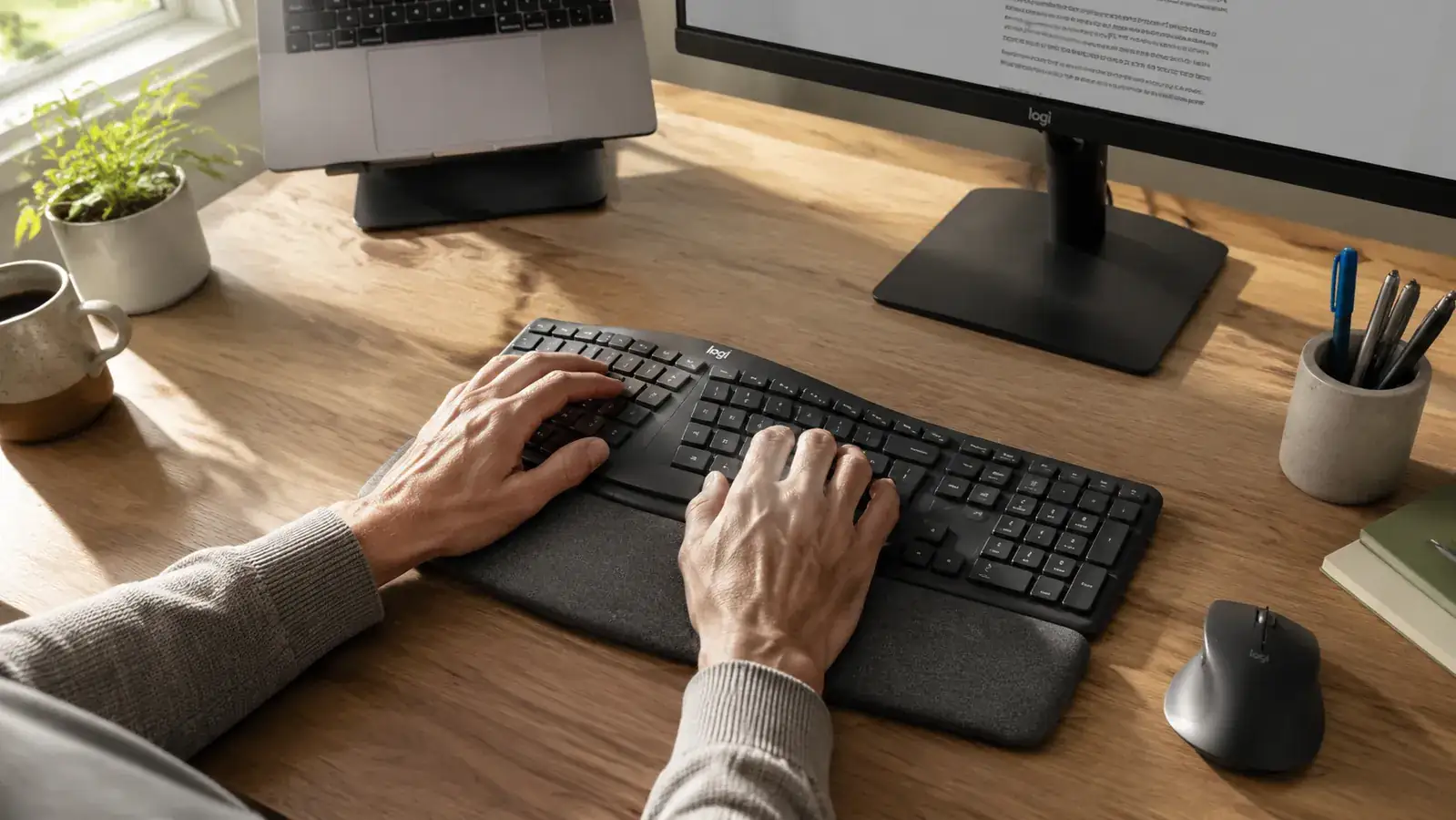
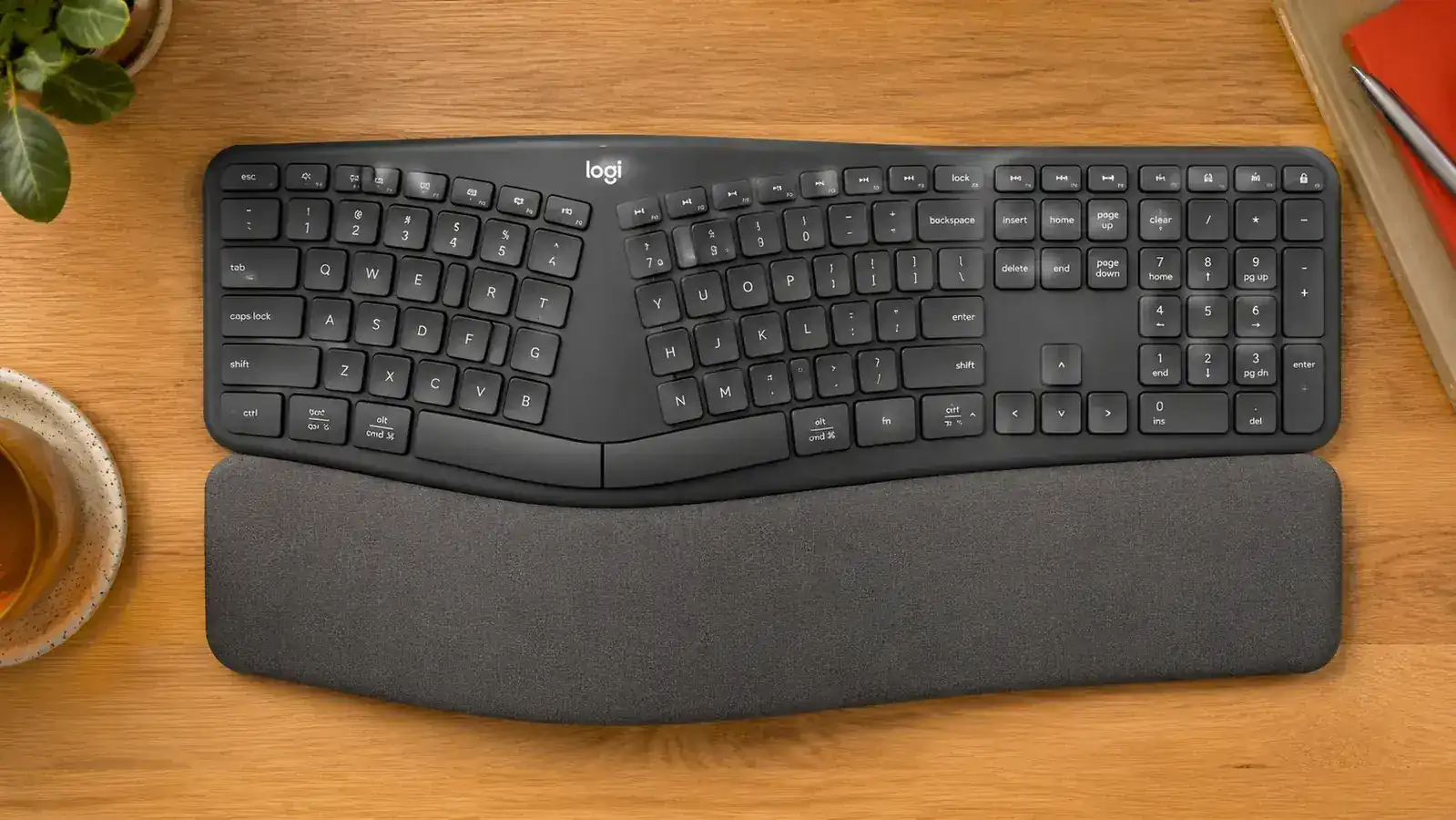
The integrated palm rest is one of the K860's defining features, and Logitech uses the word 'wrist rest' in the marketing, which is technically inaccurate and slightly misleading. You do not rest your wrists on it while you type. You rest your palms on it while you pause. Typing with your wrists pressed into any surface puts compression on the carpal tunnel, which is the opposite of what you want. The K860 rest is shaped and positioned to keep your palms lightly supported during pauses, which keeps your wrists in a neutral hover while your fingers are moving. The curve of the foam matches the natural arch of your palm. After a year the foam has compressed slightly but not dramatically. It does not feel like a new keyboard, but it does not feel wrecked either.
The rest is attached. It does not detach, which is worth knowing if you ever want to travel with the keyboard or store it differently. A removable rest would have been a smarter design choice. This is a minor complaint but it is real.
Key Feel, Noise, and the Typing Experience Over Time
The K860 uses Logitech's own low-profile scissor switches, not mechanical switches. If you are coming from a mechanical keyboard expecting satisfying tactile feedback, you will be disappointed. The keystroke is quiet, soft, and shallow, similar to a high-quality laptop keyboard but with slightly more feedback than the Apple Magic Keyboard. For a home office, particularly if you share a space with anyone else in the house or take video calls throughout the day, the quiet switches are a practical choice. Nobody on a Zoom call has ever asked me what I am typing on.
Over twelve months the switches have stayed consistent. No keys have started sticking, no keycaps have worn through, and the legends are still fully legible, which is worth noting since I type in dim lighting more often than I probably should. The keycaps are a matte dark grey that resists finger-grease smudging better than the glossy alternatives.
The key layout is standard, with one exception that will bother some people: the function row defaults to media and brightness controls, not F1 through F12. To get F1 through F12 you hold the Fn key. There is no way to swap this behavior in the Logitech Options software, at least not on Mac at the time of writing. On Windows you can toggle it. If you regularly use F-keys for shortcuts in your workflow, this is not a dealbreaker, but it is an adjustment.
Wireless Performance and Battery Life
The K860 connects via Bluetooth or the included USB-A Logi Bolt receiver. I have used Bluetooth exclusively because my MacBook's USB-A ports are occupied. Bluetooth performance has been rock solid. In twelve months I have had maybe three or four moments where a keypress did not register, always during the first thirty seconds after waking the keyboard from sleep. That is it. No dropouts mid-sentence, no lag worth mentioning.
Battery life is rated at up to two years on two AAA batteries with Bluetooth off, or shorter with Bluetooth active. I replaced my batteries at the ten-month mark when the low-battery indicator started flashing. That is a long time between changes, and it removes the USB-C charging cable friction that comes with rechargeable keyboards. I keep a pack of Eneloop rechargeables for the swap and the dead pair goes back into rotation. Practical and sustainable.
Compatibility and Multi-Device Use
The K860 supports up to three Bluetooth devices and you switch between them with the F1, F2, and F3 keys when held with Fn. In practice I use it on my MacBook Pro and occasionally pair a second channel to my iPad when I am editing on the couch. The pairing process is quick, five seconds or less once both devices are already registered. The keyboard remembers each pairing, so switching back is immediate. This feature is genuinely useful and works as described.
On Mac, the Logitech Options+ software lets you remap some keys and adjust a few behaviors. The software is lightweight and does not run noticeably in the background. On Windows the options are slightly broader, including the Fn key toggle I mentioned earlier. Out of the box on Mac the keyboard works without any software, though you lose the customization layer.
What I Liked
- Forearm and wrist discomfort measurably reduced after month two of daily use
- Split layout corrects bad typing habits you did not know you had
- Quiet scissor switches that are genuinely comfortable for all-day typing
- Excellent long-term battery life, around ten months of heavy daily use
- Rock-solid Bluetooth reliability, fewer than five missed keystrokes in twelve months
- Multi-device pairing works quickly and holds reliably across reboots
- Palm rest foam holds up well without feeling collapsed after a year
Where It Falls Short
- Learning curve drops typing speed for two to four weeks, which matters if you are on deadline
- Function row defaults to media keys, not F1-F12, with no Mac toggle in software
- Wrist rest is attached and not removable, limiting portability and storage options
- Positioned as premium it is an expensive keyboard, which feels acute when you first unbox something that looks this plain
- Not for typists who want mechanical switch feedback or a high-profile key feel
- USB-A Logi Bolt receiver is bulky and eats a port on machines that are already port-starved
Who This Is For
The K860 earns its price for full-time remote workers who type as a primary job function and are already experiencing forearm tension, wrist ache, or early repetitive strain symptoms. Writers, editors, developers, and anyone who logs 20,000-plus keystrokes a day will feel the difference within a month. It is also the right keyboard for people who have been told by a physio or doctor to address their typing posture and want a concrete tool to do it. If you work at a fixed desk, type on a Mac or Windows PC, and can tolerate two to four weeks of reduced speed while your muscle memory recalibrates, this keyboard will very likely make a real difference.
Who Should Skip It
If you carry your keyboard between locations, the K860's weight and size make it impractical. If you are a gamer, the lack of mechanical switches and the software's limited customization mean it is not built for you. If you type only a few hours a week and have no existing wrist or forearm discomfort, you will probably not feel enough benefit to justify the cost. And if you are in the middle of a high-volume deadline stretch and cannot afford a two-to-four-week speed dip, wait until you have a slower week to make the switch. The learning curve is predictable but it is real, and powering through it while you are on a deadline is unpleasant. I know this from experience.
For a direct comparison of how the K860 stacks up against the Microsoft Sculpt Ergonomic Keyboard, another popular option in this category, see our Logitech K860 vs Microsoft Sculpt comparison. And if you want to understand exactly why a split layout reduces strain at the mechanical level before spending the money, the 10 Reasons a Split Ergonomic Keyboard Can Fix Your Wrist Pain piece walks through the biomechanics in plain language.

If the forearm ache is already there, it will not get better on a flat keyboard.
The K860 is the keyboard I would recommend to a friend who typed for a living and was starting to feel it. It is not perfect and it is not cheap, but after twelve months of daily use I have not considered going back to a straight keyboard. Check today's price on Amazon.
Amazon Check Today's Price on Amazon →