

By month three of working from home full time, my right forearm had developed a specific, predictable ache. It started around 2 p.m., built through the afternoon, and was still there when I woke up the next morning. I tried a wrist rest, a bigger mouse pad, and repositioning my entire desk setup. None of it touched the problem. A physical therapist finally told me what I was doing wrong: every hour I spent with a traditional flat mouse, my forearm was pronated, rotating inward against gravity, and the muscles responsible for keeping it stable were working the whole time even when my hand was just resting on the mouse. The Logitech MX Vertical, ASIN B07FNJB8TT, was her suggestion. I was skeptical. I bought one anyway. That was eight months ago, and the flat mouse has not come back out of the drawer.
This review covers what eight months of daily use from a remote writer who does six to nine hours of computer work every single weekday actually looks like. Not the first-week honeymoon period. The full picture, including the month where I genuinely questioned whether the adjustment period was worth it.
The Quick Verdict
A genuine ergonomic upgrade for people with forearm or wrist fatigue from all-day mousing, with a real adjustment period of three to four weeks and a sensor that slightly underperforms at the high-DPI end. Worth it for most remote workers logging six-plus hours daily.
Amazon Check Today's Price →Your forearm fatigue is not going to fix itself with a wrist rest.
The MX Vertical addresses the root cause: forearm pronation. Check today's price on Amazon and see current availability.
Amazon Check Today's Price on Amazon →How I Have Used It
I write articles, edit copy, manage spreadsheets, and do light photo editing from home five days a week. A typical day is seven to eight hours at the desk, with the mouse getting continuous use for most of that. I am right-handed. My desk is at standard 30-inch height with an external keyboard on a keyboard tray, which keeps my elbows at roughly a 90-degree angle. I live in Portland and work from a dedicated office room, so this is not a laptop-on-couch situation where conditions are always changing.
I have used the MX Vertical on the Logitech Unifying receiver most of the time, with occasional Bluetooth sessions on a second laptop. I have not used the Logitech Options software beyond the initial DPI configuration. Desk surface is a cloth mousepad, roughly 12 by 16 inches. The MX Vertical charged via USB-C once in the first two months, once in the third month, and once in the fifth month. The rest of the time I forgot it needed charging.
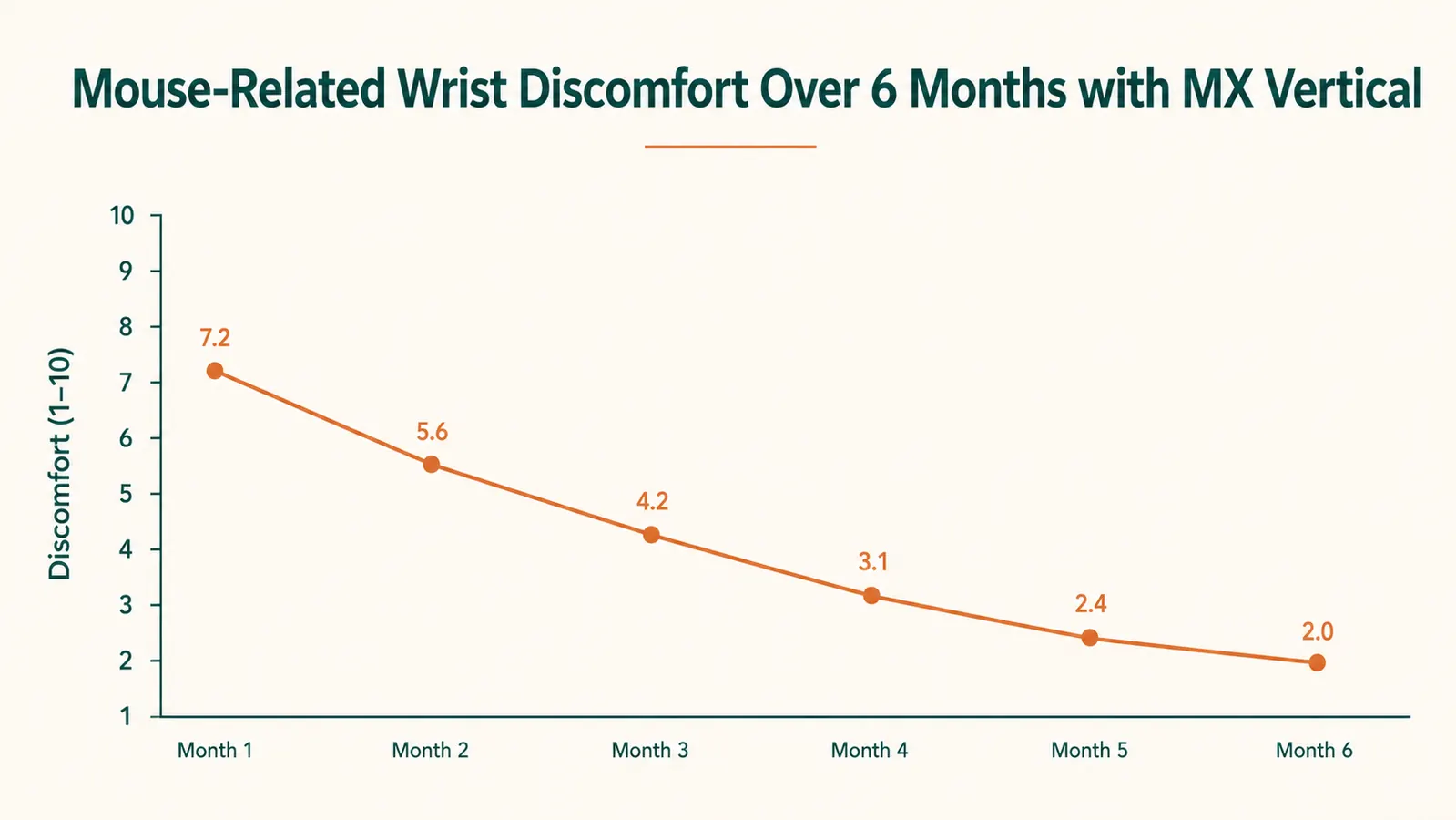
The baseline: before switching, my forearm ache was a 6 out of 10 on most afternoons and a 3 to 4 out of 10 in the mornings. After three weeks on the MX Vertical it was around 4 in the afternoon and 1 in the morning. By month two it had settled to a 2 in the afternoon on heavy-use days and essentially zero in the morning. That is not a cure. But it is a meaningful, sustained change, and it held for all eight months.
The 57-Degree Angle: What It Actually Does to Your Body
Logitech positions the MX Vertical at 57 degrees, which they describe as the natural handshake position. The marketing claim is a 10 percent reduction in muscle strain compared to a standard mouse. My physical therapist explained the mechanism more plainly: a flat mouse forces your forearm into full pronation. Your radius and ulna bones are crossed. The muscles along the outside of your forearm, particularly the pronator teres and pronator quadratus, have to actively hold that position. A vertical mouse uncrosses those bones and lets the forearm hang in a relaxed, neutral orientation. Less holding means less fatigue over time.
The 10 percent figure from Logitech's own study is real but specific. It comes from EMG measurements of muscle activation during mouse tasks. What it does not capture is the cumulative fatigue over a six-hour day, which is where the practical improvement is larger than 10 percent suggests. By early afternoon with my old mouse, my forearm muscles were already partially fatigued and less able to absorb the continued workload. With the MX Vertical, that early-fatigue onset is delayed, which means the cumulative strain by day's end is noticeably lower.
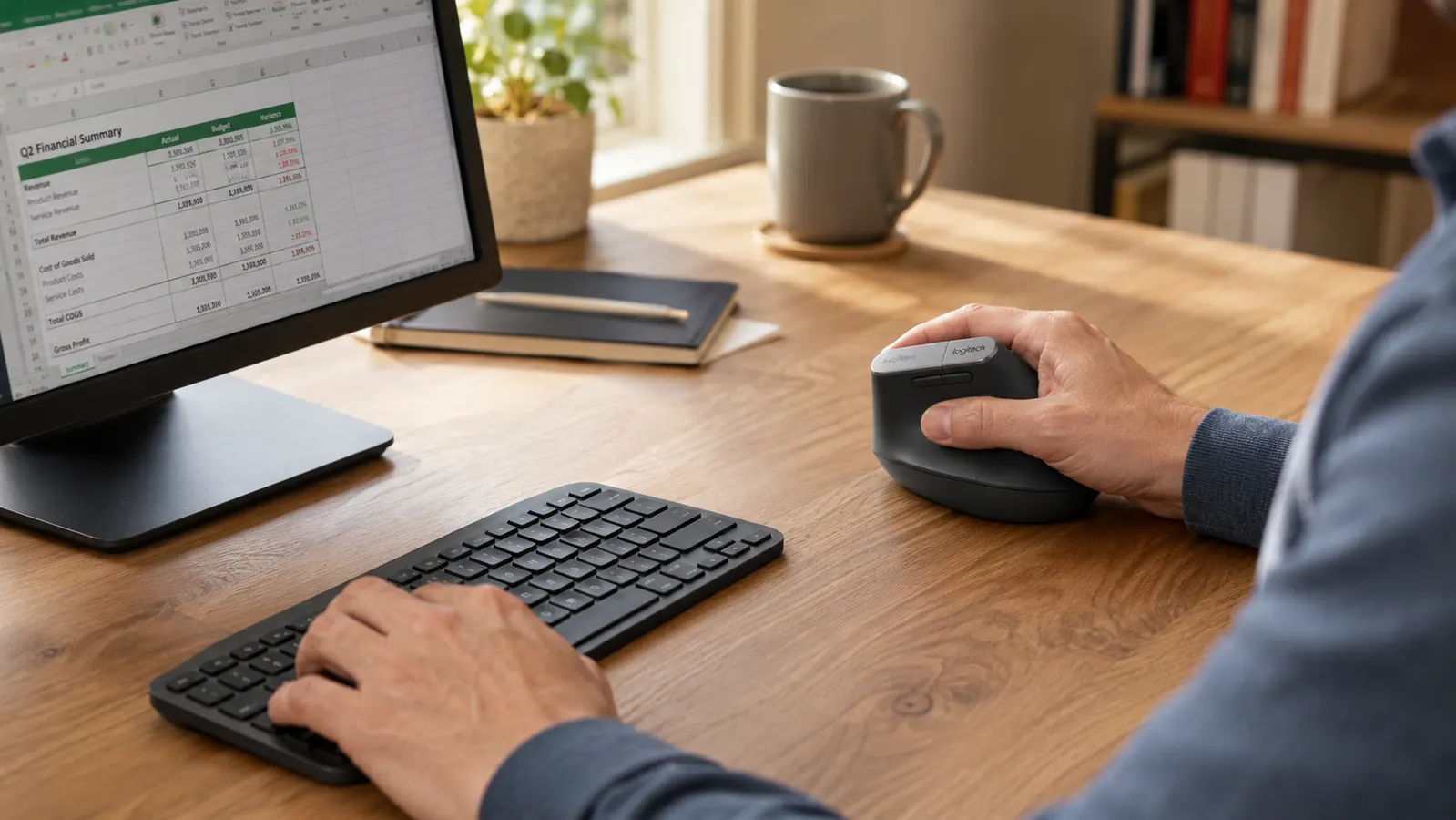
The adjustment period is real and worth addressing directly. For the first ten days, the MX Vertical felt awkward in ways that were hard to articulate. Clicking the primary button required a slightly different finger movement than on a flat mouse, because the button is now oriented vertically rather than horizontally. Fine pointer control during tasks like selecting text or clicking small UI elements felt imprecise. My error rate on close clicks was noticeably higher. I almost returned it at the two-week mark.
I did not return it, and by week three the precision issues had mostly resolved. By week four I was operating at my previous speed and accuracy. The adjustment is a motor skill retraining, not a cognitive one. Your hand knows what to do; it just has to relearn the precise angles. If you buy this mouse and try it for five days and it feels wrong, that is normal. Give it three weeks before deciding.
Build Quality and Features: What Holds Up Over Months
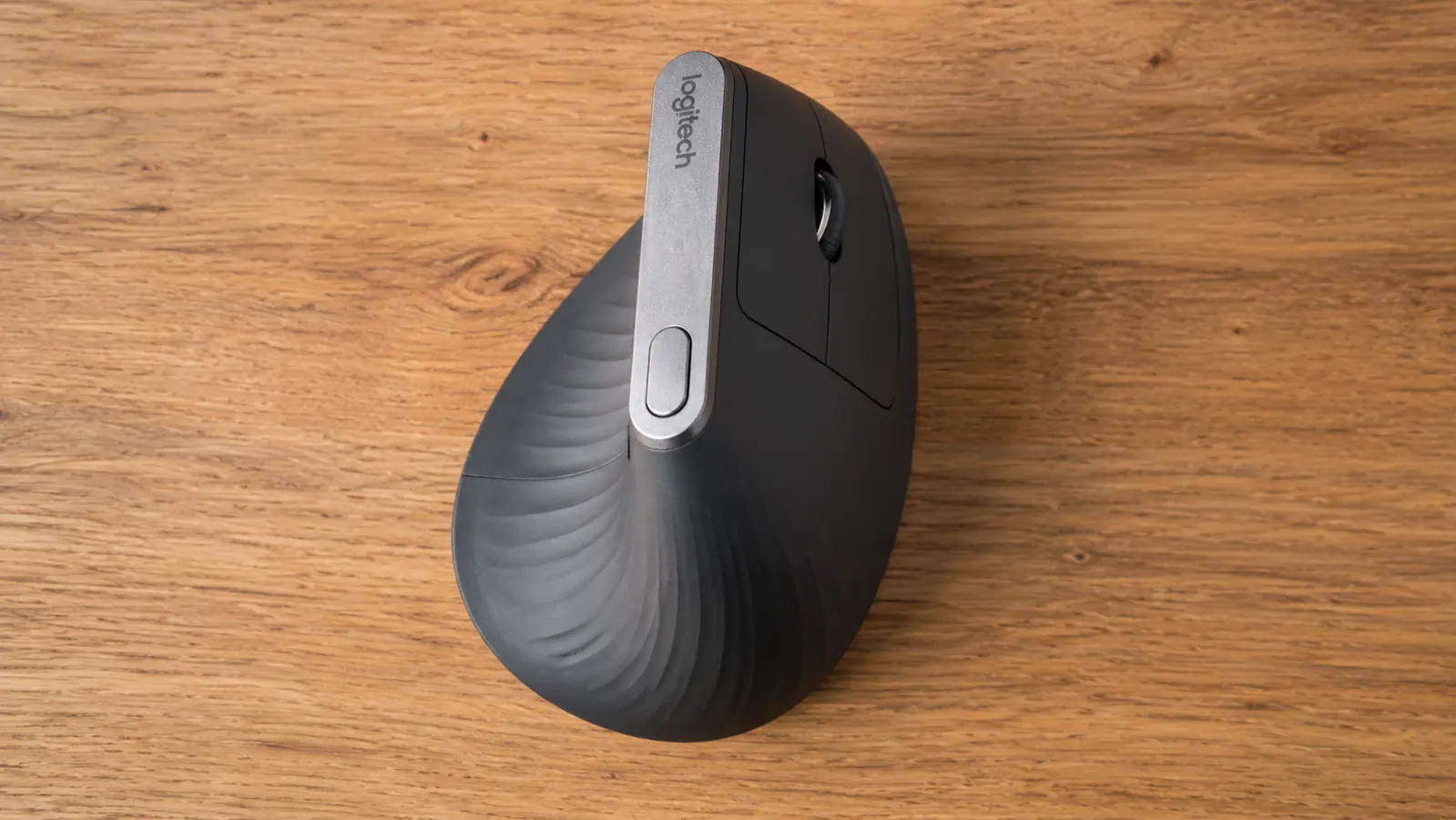
The MX Vertical is built to Logitech's MX standard, which means it is noticeably more substantial than budget peripherals. The outer shell has a soft-touch coating with a textured grip area on the thumb rest side. After eight months of daily use, the coating shows no peeling or wear that I can detect. The thumb divot has stayed grippy. The scroll wheel, which on cheaper mice starts to feel notchy and imprecise around month four, still feels the same as it did on day one: smooth with a light tactile detent per scroll step.
The button layout includes two primary click buttons, a scroll wheel with horizontal tilt, two back-forward thumb buttons, and a DPI shift button below the scroll wheel. The DPI shift button is recessed, which means I have never accidentally pressed it during a work session. The primary click buttons have a satisfying resistance without feeling stiff. The back-forward thumb buttons are easy to reach without repositioning the hand and have become so integrated into my browser navigation that I struggle to use borrowed mice that do not have them.
Battery life is exceptional. Logitech's claim is four months per charge. My real-world experience is somewhere between six and eight weeks of heavy daily use before the battery indicator light started flickering. Charging via USB-C takes about three hours from nearly empty. The cable is included.
The Sensor: Where the MX Vertical Falls Short
This is the honest part. The MX Vertical uses a Darkfield sensor that tracks on virtually any surface, including glass, which is useful. The DPI range is 400 to 4000, switchable in four steps via the DPI button. At 400 and 1000 DPI the sensor is accurate and responsive. At 4000 DPI, which is the highest setting, I noticed a subtle but real inconsistency in pointer movement during fast sweeps. The pointer occasionally moved further or shorter than I intended when I moved the mouse quickly across a large portion of the mousepad.
For my work, which is writing and editing with some spreadsheet management, this is not a problem. I default to 1000 DPI and it is precise enough for everything I do. If you are doing design work, video editing with fine timeline scrubbing, or any task where you need accurate fast pointer movement at high DPI, the sensor performance at 4000 DPI is a real limitation. At those tasks, I would test it before committing to it as your only mouse.
Tracking on my cloth mousepad is consistent and I have never had an erratic movement. On a bare wooden desk surface it also works well. On a reflective glass desk, I have not tested it myself but Logitech's Darkfield is specifically marketed for glass, so the spec suggests it would be fine.
By month two, the afternoon forearm ache had dropped from a 6 to a 2 on heavy-use days. That improvement has held every single month since. It did not fix the problem. It fixed most of it, and that is worth a lot over a full year of work.
Multi-Device Use and Connectivity
The MX Vertical connects via the Logitech Unifying receiver or Bluetooth. It supports one device at a time, not simultaneous multi-device switching like the MX Master 3. If you use two computers, you switch by going into your Bluetooth settings and reconnecting. It is not the seamless button-tap switching of more expensive Logitech mice. For a single primary computer this is a non-issue. For a two-computer setup where you switch frequently, it will get annoying.
The Unifying receiver connection has been rock-solid over eight months. No dropouts, no lag, no reconnection events. Bluetooth on my secondary laptop has been stable as well, just slower to initially pair than the Unifying connection. If you have a Logitech Unifying receiver already plugged into your machine for another device, you can pair the MX Vertical to the same receiver and free up a USB port.
Alternatives I Considered
The most common comparison is the Anker 2.4G vertical mouse, which costs a fraction of the MX Vertical. I borrowed one from a colleague for two weeks before committing to the Logitech. The Anker is a legitimate budget option and it does put your hand in the same basic vertical orientation. What it lacks is the Darkfield sensor quality, the scroll wheel precision, and the build quality. The Anker's scroll wheel felt loose by the end of week two. The buttons required more force to click. If your budget is the deciding factor, the Anker is not a bad start, but it is a different class of product. I cover both in detail in the Logitech MX Vertical vs Anker comparison if you want the full side-by-side.
The Evoluent VerticalMouse is another option at a similar price. Its angle is more extreme and the button layout is different. Some people find it more comfortable, particularly those with larger hands. The MX Vertical fits my medium-sized hand well, but if you have large hands and find the MX Vertical cramped, the Evoluent is worth a look.
What I Liked
- Measurable, sustained reduction in forearm fatigue after the adjustment period
- Exceptional build quality that shows no degradation after eight months of daily use
- Battery life that means charging is an occasional event, not a maintenance chore
- Darkfield sensor tracks reliably on cloth pads, bare wood, and most desk surfaces
- Scroll wheel stays precise and smooth even after months of heavy use
- Back-forward thumb buttons become an irreplaceable part of browser navigation
Where It Falls Short
- Three to four week adjustment period that will feel uncomfortable and imprecise at first
- Sensor underperforms at 4000 DPI during fast pointer sweeps, not ideal for design or video work
- No easy multi-device button switching, only one paired device at a time
- Right-hand only, no left-handed version available
- Premium price requires a real budget commitment versus budget vertical alternatives
Who This Is For
The MX Vertical is the right mouse for remote workers who spend six or more hours daily at a computer and are experiencing forearm tension, wrist fatigue, or that specific mid-afternoon ache along the outside of the forearm. It is also the right choice for people who have already tried wrist rests and ergonomic mouse pads and found them insufficient, which was my situation exactly. If your work is primarily document editing, spreadsheet management, email, and browser-based tasks, the sensor performance is more than adequate at its lower DPI settings, and the build quality will hold up through years of daily use.
Who Should Skip It
Skip the MX Vertical if you do precision design work, fine video timeline editing, or gaming where fast, high-DPI cursor movement accuracy is critical. Skip it if you are left-handed, since there is no left-handed version. Skip it if you frequently switch between two computers and need one-button device switching, as the MX Vertical does not offer that. And skip it if your primary concern is price: the Anker 2.4G vertical mouse costs significantly less and puts your hand in the same approximate orientation. See the full breakdown of why vertical mice reduce wrist and forearm pain if you are still deciding whether the design is worth trying at all.
Eight months in, I would buy this mouse again on day one.
The forearm fatigue improvement is real, the build quality is genuinely durable, and the battery life makes it low-maintenance. Check today's price and availability on Amazon.
Amazon Check Today's Price on Amazon →