

My neck started sending signals I could not ignore in late 2024. Not sharp pain, just a low-level stiffness that showed up every afternoon around 3 PM and followed me into the evening. I had already tried a new chair, a lumbar cushion, and a standing desk converter. None of them fixed it. A physio appointment in October pointed straight at the obvious thing I had been ignoring: my laptop screen sat flat on the desk, which meant I spent eight hours a day looking roughly 30 degrees downward. She told me to raise the screen to eye level. I went home, ordered the Lamicall Adjustable Aluminum Laptop Stand, and it arrived two days later. That was ten months ago. I have used it every single workday since.
The Lamicall stand holds a 4.8-star rating from over 10,000 Amazon reviewers, which is unusually strong for a product in this price range. I went in skeptical that a sub-forty-dollar piece of aluminum could genuinely change anything. Ten months of daily use changed that skepticism. Here is what I actually found.
The Quick Verdict
A well-built aluminum stand that solves the neck-strain problem for most remote workers at a price that is hard to argue with. The cable management is minimal and the rubber foot strips wear down over time, but neither is a dealbreaker.
Amazon Check Today's Price →Still fighting afternoon neck stiffness? The fix might cost less than your last lunch out.
The Lamicall aluminum stand is the most-rated laptop riser in this price range for a reason. Ten months of daily use and it still earns its spot on my desk.
Amazon Check Today's Price on Amazon →How I Have Used It
My setup is a 13-inch MacBook Pro on a 60-inch pine-top desk. I work from home full time, typically 8 to 9 hours a day writing and editing. The stand lives in one spot and does not move. I pair it with a Logitech MX Keys compact keyboard and an MX Anywhere 3 mouse, which sit on the desk surface in front of it. That combination is what ergonomic desk guides call the split-input setup: screen at eye level, keyboard and mouse at elbow height. It is the posture default your chair cannot achieve if your screen is flat on the desk.
Over ten months I have used the stand across two seasonal humidity swings, moved it twice during desk cleanouts, and knocked it sideways twice when grabbing for my coffee too fast. I adjusted the angle probably thirty times in the first two weeks, then settled on a position and have not touched the angle mechanism since. That pattern of behavior, settling in and then forgetting the product exists, is my own benchmark for a well-designed piece of desk gear.
In the first two weeks I also tested the full height range. The Lamicall adjusts from roughly 2.5 inches to about 9.8 inches off the desk surface, which translates to a screen lift that works for seated heights anywhere from about 5'2" to 6'2" without an unusually tall chair. My desk sits at 30 inches and my eyes land at about 51 inches when seated. With the stand at its fourth-highest position, the top of my MacBook screen sits just below eye level, which is the ergonomically correct position. Finding that setting took about four minutes.
Build Quality After Ten Months
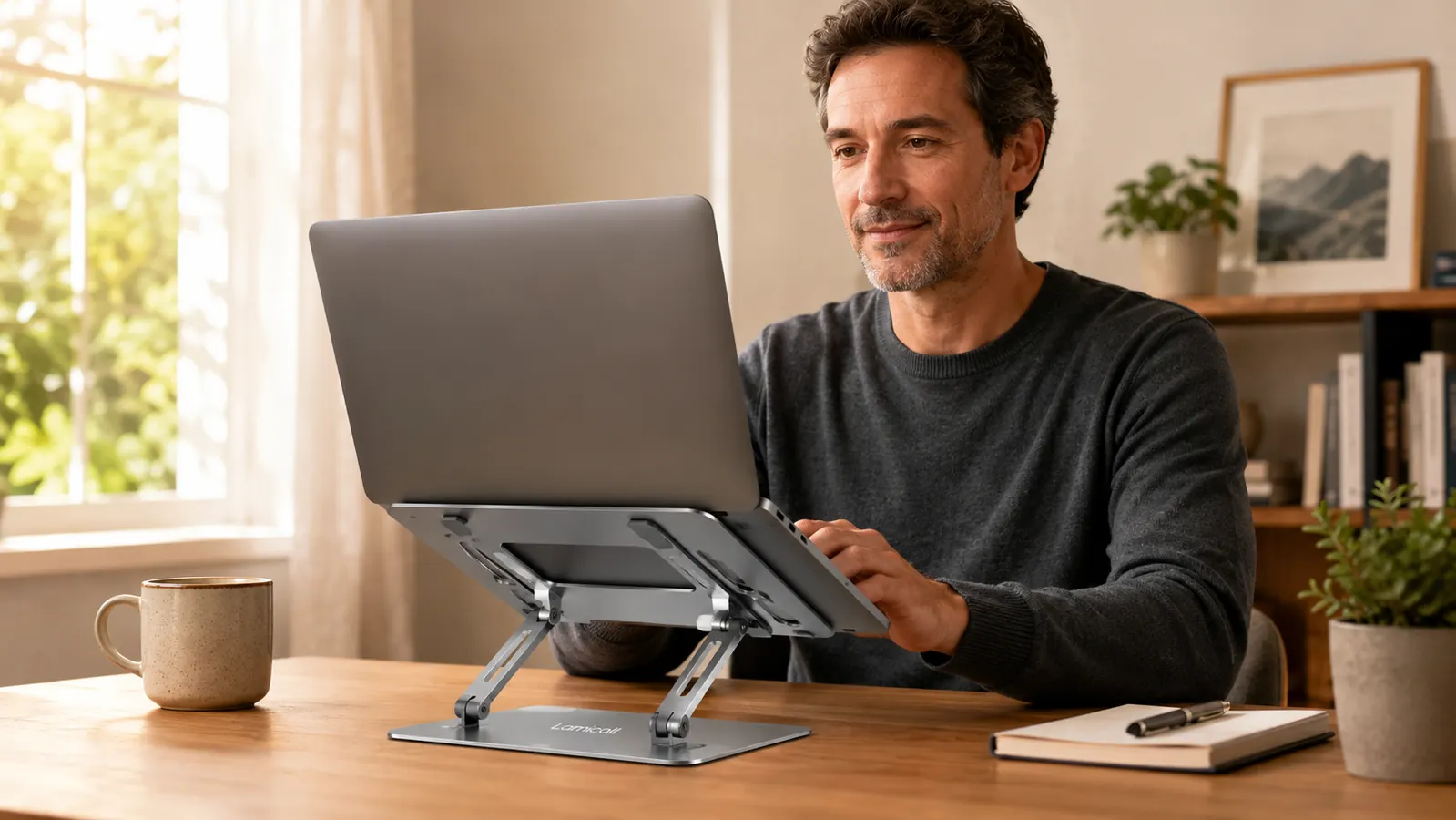
The Lamicall stand is made from a single bent piece of aluminum alloy with a hinged center joint and two locking side arms that let you set the angle. It weighs about 2.4 pounds. After ten months of daily use, every surface I can see or feel is exactly as it was on day one. The anodized finish has not chipped. The hinge is tight. There is no play or rattle in the arm joints. That is not a small thing at this price. Cheaper stands I have tried, including a plastic-and-steel model I used for about three months before it started creaking, tended to show looseness in the hinge mechanism by month two.
The one visible sign of wear is the rubber strips on the base feet and on the lip that cradles the laptop. The base strips are still gripping the desk well. The lip strips have compressed slightly, which is expected, and has not caused any slippage. My MacBook has not shifted position on the stand once in ten months. A 15-inch or 16-inch MacBook Pro would add roughly 2 pounds to the load, and I have no reason to think the stand would behave differently under that weight given how rigid the hinge feels now.
The Neck Strain Result: Six Weeks to Notice, Ten Months to Confirm
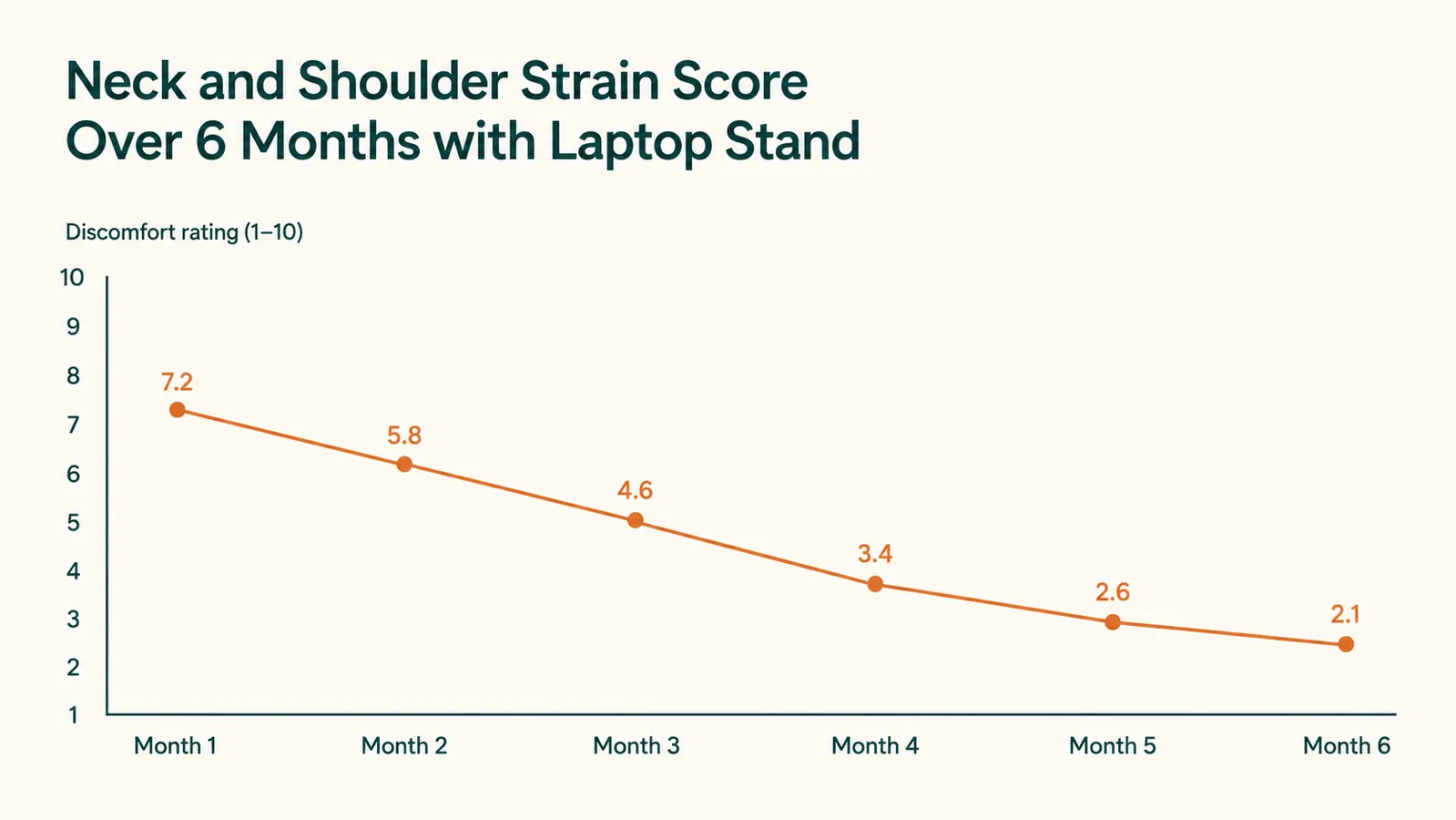
I want to be specific here because vague claims about posture products drive me up the wall. In the first week with the stand I noticed nothing except that my screen was higher and I needed to consciously lower my external keyboard a bit. In weeks two and three I noticed that the 3 PM stiffness was showing up less predictably, some days appearing, some days not. By week six it had essentially stopped being a daily occurrence. It now shows up occasionally on days when I have been in video calls for four-plus hours without a break, which suggests those sessions have their own posture problems the stand cannot address by itself.
I am not claiming the Lamicall stand cured my neck problems. I am saying that raising the screen to eye level, which is what the stand does, removed the single biggest mechanical cause of that stiffness. If you are working 7 or 8 hours with your chin tilted down 20 to 30 degrees, you are straining the muscles that run down the back of your neck and across your upper trapezius. A stand that raises your screen takes that mechanical load off. The Lamicall does exactly that, reliably, for every work session.
The 3 PM neck stiffness I had accepted as just how my days go essentially stopped by week six. Raising the screen took the mechanical load off. That is the whole story.
Ventilation and Heat: What I Measured
The Lamicall stand props the laptop at an angle with open air underneath and behind it. That is a meaningful ventilation improvement over a flat-on-desk setup, where the laptop's rear vents are partially obstructed by the desk surface. My MacBook Pro runs warm under heavy CPU loads, specifically during video exports and large Figma files. With the stand, the underside of the machine has room to shed heat. I have not done instrumented thermal tests, but I can tell you that my machine no longer throttles during sustained CPU loads the way it occasionally did before, which I attribute at least partly to better airflow.
I want to flag one thermal caveat: the aluminum stand itself conducts the laptop's heat into the cradle lip. On genuinely hot processing days I can feel warmth in the stand's aluminum. It has never been uncomfortably hot to touch, but if you run workloads that push your laptop's thermal limits, be aware that the stand is not thermally isolated from the machine. That said, this is true of every aluminum stand I am aware of and is not a Lamicall-specific flaw.

What Annoys Me After Ten Months
There are two genuine complaints. The first is cable management. The Lamicall stand has no built-in cable routing, no groove, no clip, nothing. My power cable, USB hub cable, and external display cable all run behind the stand in whatever configuration I choose to leave them in. For a permanent desk setup, that means the cable situation is entirely your problem to solve with clips or ties you buy separately. It is not a fatal flaw, but a well-designed stand in this price bracket should at least have a rear channel for cables.
The second complaint is that adjusting the angle and height requires pressing two lever buttons simultaneously on the side arms while holding the laptop. It is not difficult, but it is a two-hand operation that feels fussier than it needs to be. Since I settled on my angle in the first two weeks and have not touched it since, this has not been a recurring annoyance. But if you travel with the stand and frequently reconfigure it between locations, the adjustment mechanism will get old quickly.
What I Liked
- Solid aluminum build with no loosening, creaking, or finish wear after ten months of daily use
- Height range covers the full seated eye-level window for most adults without a specialized tall chair
- Open underside provides real ventilation improvement over a flat-on-desk setup
- Stable enough that a 15-to-16-inch laptop does not cause any rock or wobble at desk height
- Setup takes under two minutes from the box
- Budget-friendly, which is genuinely hard to beat for all-metal construction
Where It Falls Short
- No cable management built in, so your cable situation stays entirely your problem
- Two-handed angle adjustment feels fussier than necessary, especially for anyone who moves it frequently
- Rubber foot strips will compress over time and may need replacement after 18 to 24 months of heavy use
- Does not work well as a portable stand for lap use or couch use, it needs a flat desk surface
Who This Is For
The Lamicall stand is built for the remote or hybrid worker who uses a laptop at a fixed desk every day and pairs it with an external keyboard and mouse. If that describes you, this is the product. You get a proper eye-level raise, stable aluminum construction, and meaningful ventilation improvement at a price that does not require budget justification. The 4.8-star rating from over 10,000 buyers is not an anomaly. This is a well-designed product that does exactly what it says it does. If your neck hurts by mid-afternoon and your screen is currently flat on the desk, this stand is the most likely single fix, and it costs less than a dinner out.
Who Should Skip It
Skip the Lamicall if you want a stand that doubles as a portable laptop riser you carry in a bag. The stand is sturdy partly because it is not particularly lightweight for its size, and the adjustment mechanism is not quick enough for a pack-and-reconfigure workflow. The Nexstand K2 is better for that use case. Also skip it if you have a desk setup with a lot of cable runs and need integrated cable routing. You will add a cable management bar anyway, and at that point a stand with a built-in routing channel would have saved you the extra purchase. For a stationary home office desk, though, none of those caveats apply and the Lamicall is the straightforward right answer.
Ten months of daily use and it still earns its spot. At this price, there is no reason to keep tolerating a flat-screen setup.
The Lamicall stand is one of the top-rated laptop risers on Amazon. All-aluminum construction, proper height range, and a price that makes the decision easy.
Amazon Check Today's Price on Amazon →